 Stylus Maintenance (Touch Screen)

Tip Replacement
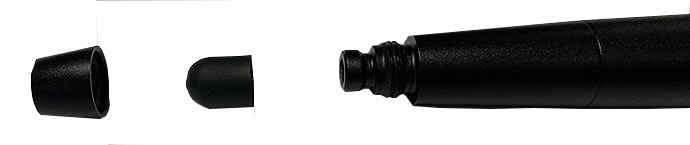
Periodically the capacitive stylus tip may need to be replaced.
To replace, unthread (counterclockwise) the collar then remove the tip.
Stylus tips are available as optional equipment (contact your sales representative for replacements).
Do not overtighten the stylus tip.

LED Light Battery Replacement
| 1. | Unthread the end cap counterclockwise. |
| 2. | Remove the coin type battery pack, note the polarity of the battery pack for re-installation. |
Three coin type LR932 batteries are used in series. Contact your sales representative for replacements.
| 3. | Replace the battery pack and install the end cap. Do not overtighten the end cap. |
