Skip To Main Content
Account
Settings
Logout
  • placeholder
Account
Settings
Logout
Filter:
Submit Search
ClosedStylus Maintenance (Touch Screen)

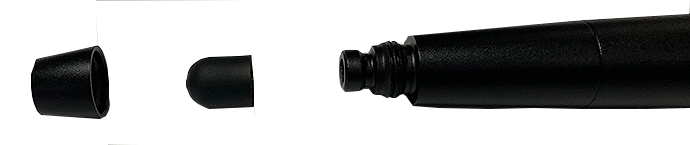
Tip Replacement

Periodically the capacitive stylus tip may need to be replaced.

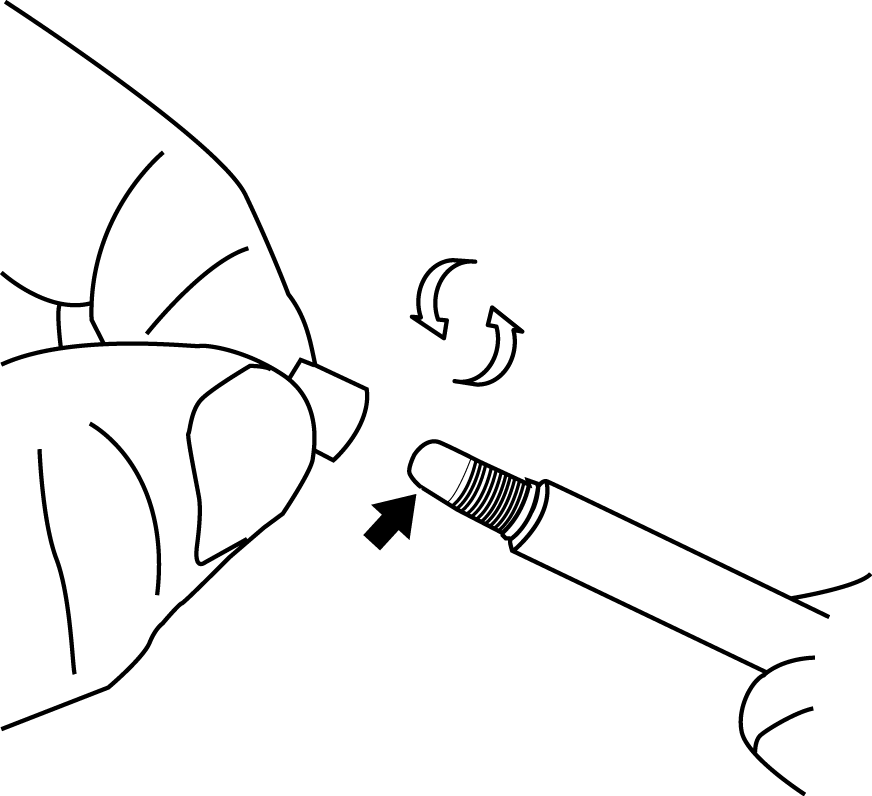
To replace, unthread (counterclockwise) the collar then remove the tip.

Stylus tips are available as optional equipment (contact your sales representative for replacements).

Do not overtighten the stylus tip.
LED Light Battery Replacement

1. Unthread the end cap counterclockwise.
2. Remove the coin type battery pack, note the polarity of the battery pack for re-installation.

Three coin type LR932 batteries are used in series. Contact your sales representative for replacements.

3. Replace the battery pack and install the end cap. Do not overtighten the end cap.

Got Questions?

Contact our Customer Care
Department

Email: techsales.uk@snapon.com

Tel: (01553) 692422

For Snap-on Tools or to contact your
local franchisee call (01536) 413800

Email: kettcustserv@snapon.com

Snap-on Diagnostics UK YouTube
Channel

Product Brochures

Special Offers

Privacy Policy

UK Modern Slavery Act Disclosure
Statement

Equipment Focus Articles

Intelligent Diagnostics Tool Matcher

User Manuals

Contact Us

Snap-on UK Tax Policy

Training and Support

Garage Equipment Video Gallery

Buy Spare Parts

Cookies and Similar Technologies (CST)

Terms and Conditions

News Centre

Snap-on is a trademark of Snap-on Incorporated. All other marks are marks of their respective holders. ©2024 Snap-on Incorporated. All Rights Reserved.