On-screen data cable connection instructions are provided.
The illustrations below shows the typical data cable connection using the DA-6 data cable adapter connected to the CSM.
The ISO-1 SVI cable adapter (ISO 19689 / Euro5) must be used with diagnostic software version 22.2 or later.
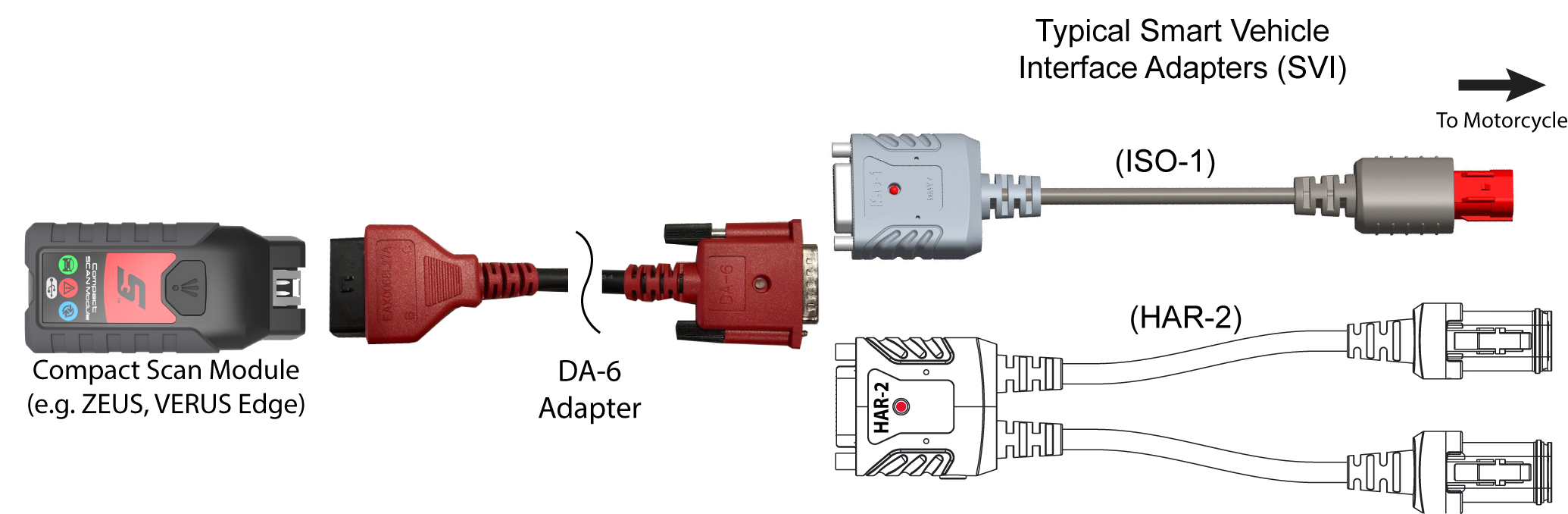
| 1. | Follow the onscreen instructions to connect the applicable Smart Vehicle Interface (SVI) to the motorcycle diagnostic connector. |
The SVI requires 12VDC power to communicate. Power is normally supplied through the motorcycle diagnostic connector, however the supplied 12VDC power accessory cable (not shown) can be used when power is needed. When the LED is on, the SVI is being powered.
| 2. | Connect the applicable data cable/adapter to the SVI and |
Ensure the LEDs on the SVI and data cables are on when establishing communication between the motorcycle and diagnostic tool.
Contact your sales representative to purchase additional Smart Vehicle Adapters (SVIs) for other Motorcycle manufacturers.


