Introduction
Modern vehicles like the Jeep® Renegade are fitted with sophisticated Advanced Driver Assistance Systems (ADAS), including Adaptive Cruise Control (ACC), Forward Collision Warning, and Lane Monitoring. For independent shops, maintaining and recalibrating these systems during repairs presents both a challenge and an opportunity.

With Snap-on® diagnostic platforms, independent shop technicians can now access Adaptive Cruise Control Module Special Functions on the Jeep Renegade—tasks previously limited to OEM tools. This article outlines a complete workflow, technical insights, and troubleshooting tips, helping shops deliver safe, professional, and confident vehicle repair.
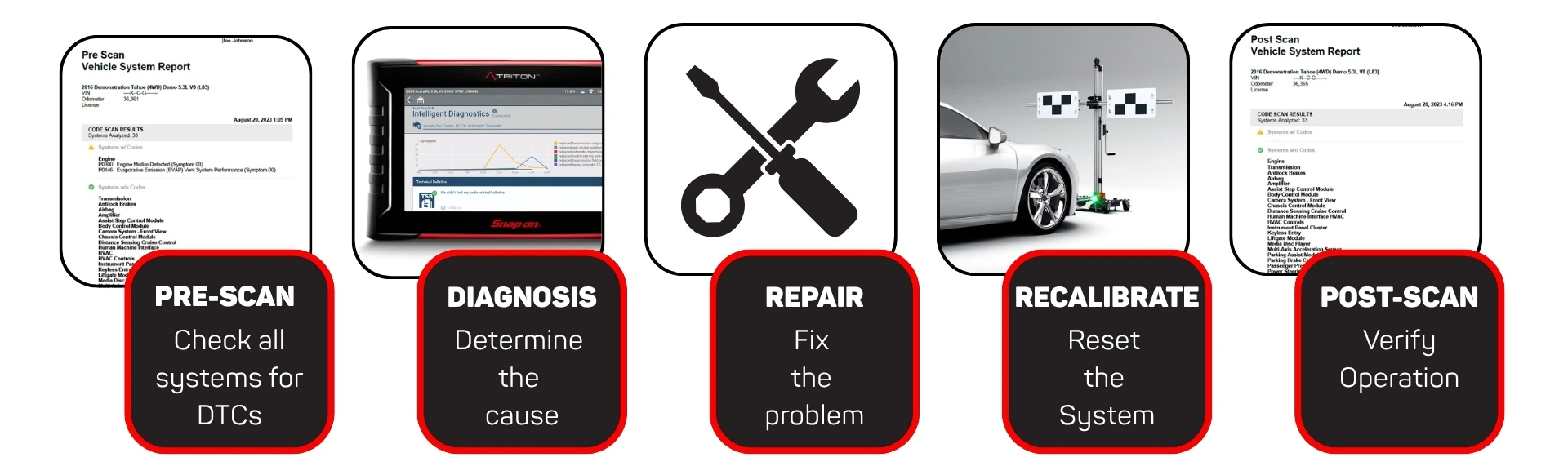
Typical Diagnostic Workflow
A structured calibration process ensures accuracy, efficiency, and customer confidence:
- Pre-Scan: Identify ADAS systems, retrieve fault codes, and review TSBs for the Jeep Renegade.
- Repair / Adjustment: Replace or adjust components (radar, bumper, ECU, etc.).
- Static Recalibration: Use Snap-on® tools with John Bean® EZ-ADAS® or Tru-Point® to complete radar calibration.
- Post-Scan: Confirm successful recalibration, clear codes, and save results for customer documentation.
Why a Pre- and Post-Scan Matters
Before any ADAS-related repair or calibration, always perform a full system scan.
Key benefits:
- Identify all fitted ADAS systems and any existing Diagnostic Trouble Codes (DTCs)
- Provide clear, documented proof of system status before and after repair. Verifying the repair which is useful when providing evidence to customers and insurance companies.
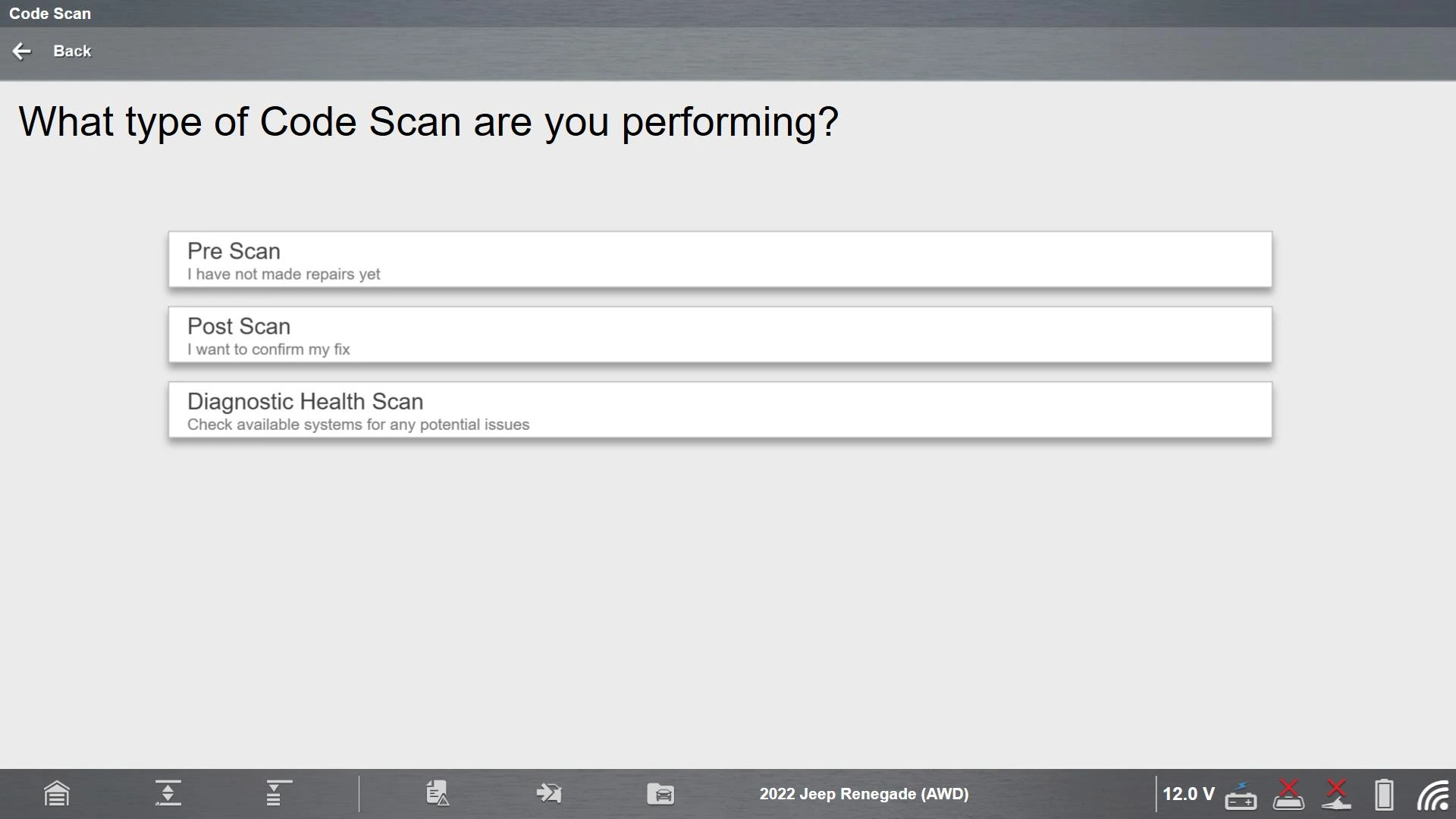
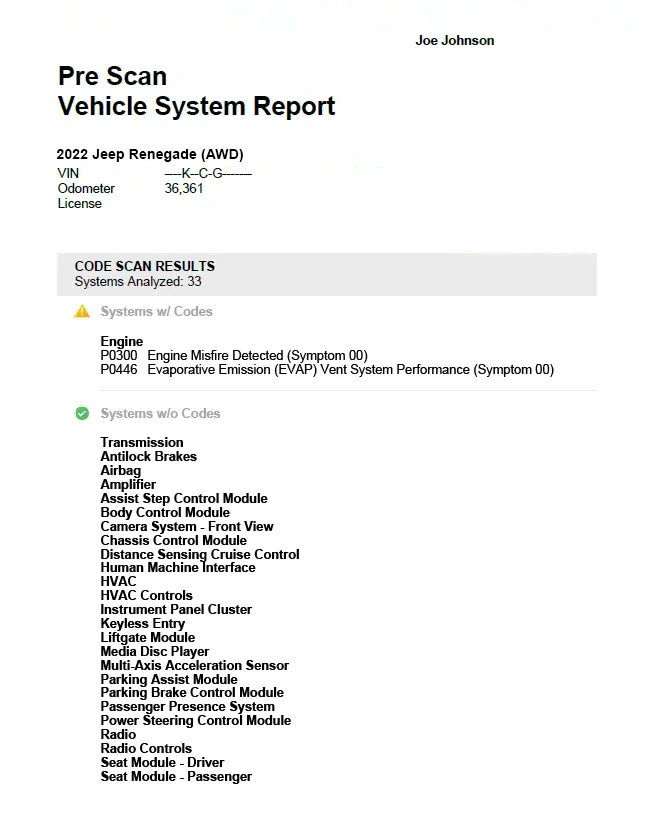
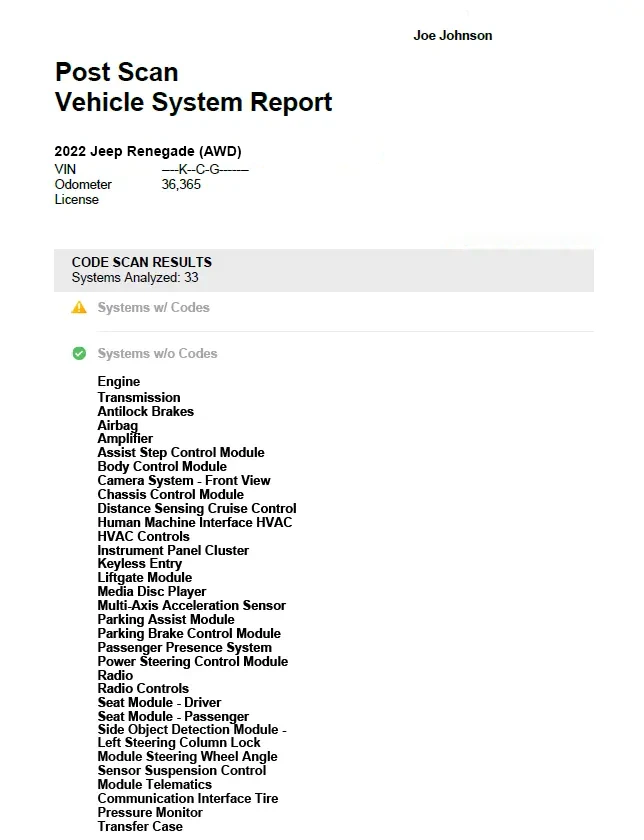
A pre-scan sets the foundation for a smooth workflow and demonstrates your professionalism. For more detail on the benefits of Snap-on® Pre- and Post-Scans, read the related article here.
Technical Insight: Understanding the Jeep® Renegade ACC Radar Recalibration
The Jeep® Renegade’s Adaptive Cruise Control system uses a forward-facing radar sensor mounted behind the front bumper. This radar continuously monitors the distance and relative speed of vehicles ahead to manage speed and maintain safe following distances.
Whenever the radar sensor, front bumper, or control unit is replaced or adjusted, a static radar calibration is required to realign the system’s field of view to the vehicle’s thrust line and pitch angle.
Using a Snap-on® car diagnostic tool, techs can access the Active Alignment Procedure under ACC Miscellaneous Functions to perform this calibration. The process provides clear, on-screen guidance, ensuring that the radar is properly aligned to OEM standards.
Before starting the test, be sure to set up the reflector (Using EZ-ADAS or TruPoint). The reflector will be aligned with the centerline of the vehicle, 1280mm away (+/- 50mm). Follow the onscreen instructions to complete the calibration.
New in the fall software release
Snap-on® diagnostic platforms now support Adaptive Cruise Control Module Special Functions, expanding your shops’ diagnostic capability.
Functional Tests include:
- Chime Test – verifies system alert output
- Safety Indication: Normal Cruise Control – checks communication and display on the instrument cluster
- Safety Indication: Adaptive Cruise Control – confirms adaptive mode indicator operation
- DASM Safety Indication: Forward Collision Warning – validates forward collision alert response
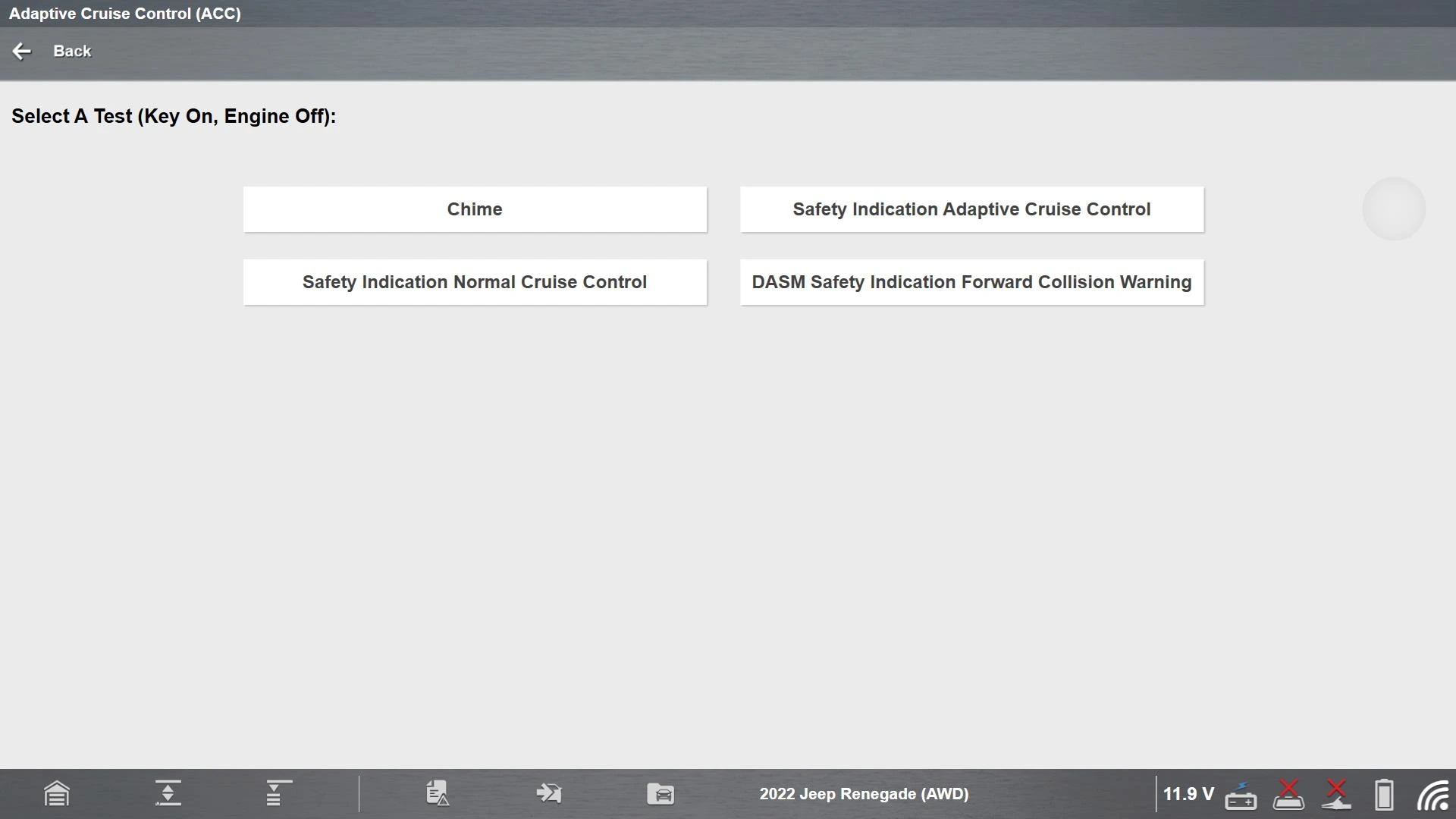
Miscellaneous Procedure:
- Active Alignment Procedure – required when:
- The radar sensor or ECU is replaced
- The front bumper or grille is removed or refitted
- Rear axle convergence or front geometry changes occur
- A dedicated ADAS warning light is active
- Wheels or tires are changed
These functions allow shops to perform complete ACC calibrations without external OEM tools, saving time while maintaining manufacturer compliance.
ADAS Target Setup: Precision Through John Bean® EZ-ADAS® or Tru-Point®
For static calibration, accurate target setup is critical. Snap-on® recommends John Bean® EZ-ADAS® or Tru-Point® calibration systems, which ensure correct target positioning in accordance with OEM specifications.
Both systems use precision referencing to the vehicle’s thrust line, compensating for floor level variations and setup inconsistencies. This guarantees the radar’s alignment and field of view match the manufacturer’s parameters.
Quick Fact: A radar sensor misaligned by just one degree can result in an error of more than 1.7 meters at a distance of 100 meters — making precise calibration essential for reliable system performance.

Secure Vehicle Gateway Access via Snap-on Security Link™
From 2018 onwards, many Chrysler, Dodge, Jeep, and Ram (CDJR) vehicles require secure gateway access for key diagnostic and calibration functions. These gateways protect vital systems from unauthorized access, but they also restrict technicians from performing necessary procedures unless authenticated.
Snap-on® has partnered with vehicle manufacturers to provide seamless secure access via Snap-on® Security Link™, integrated directly within the diagnostic platform.
This enables shops to perform OEM-secured operations such as ACC calibration, bi-directional controls, and code clearing.
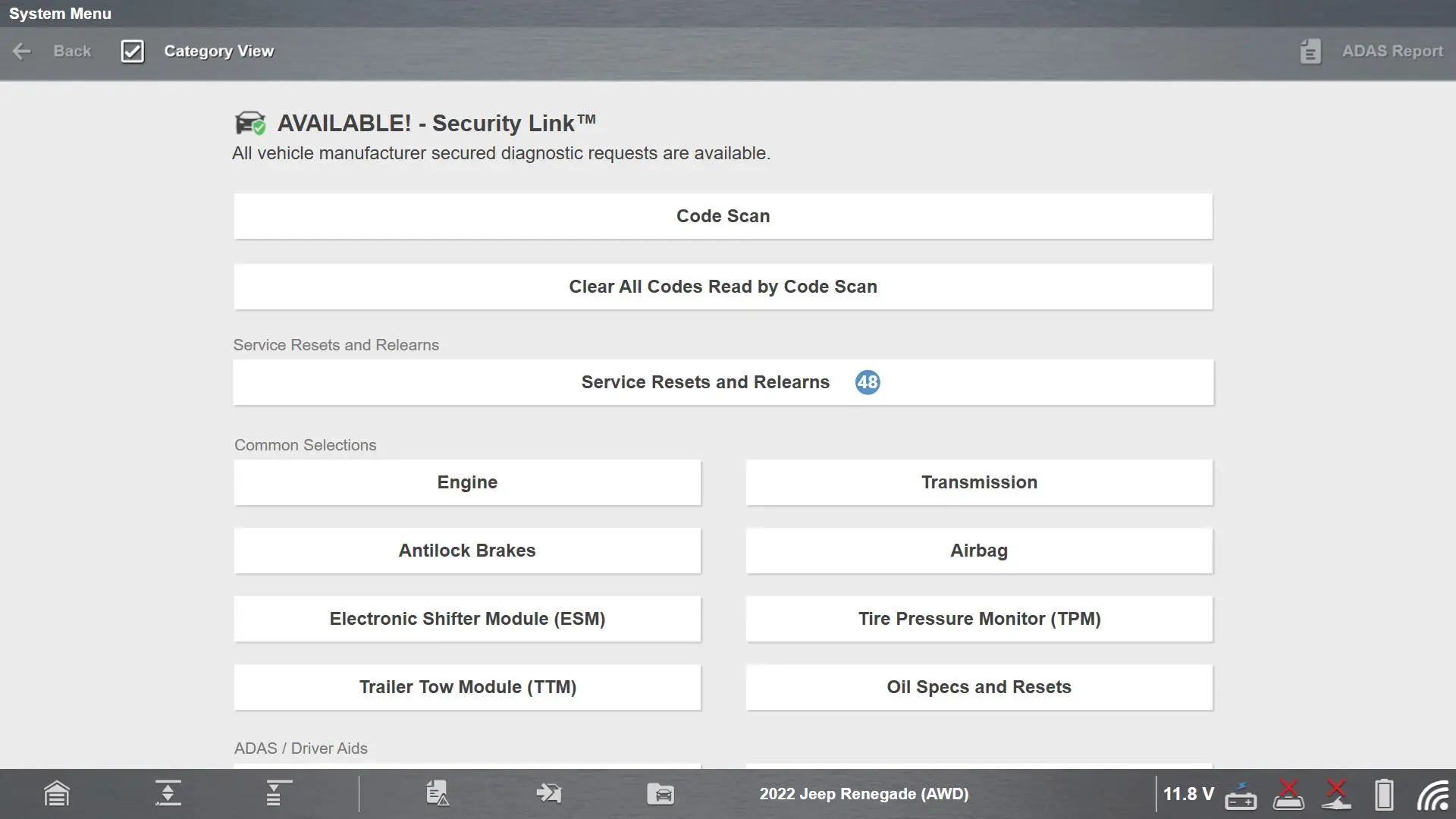
To ensure access:
- Maintain an active AutoAuth account subscription.
- Link your tool via Technician Profile (Click here for a step-by-step guide)
- Use the latest Snap-on® diagnostic software.
- Keep a stable Wi-Fi connection throughout the process.
Unlike generic tools that charge additional fees for secure access, Snap-on® platforms provide Security Link™ connectivity at no additional cost, covering:
1Chrysler,® 1 Dodge,® 1Jeep,® 1RAM,® Volkswagen,® Audi,® 1Mercedes-Benz,® 1Nissan,® Volvo,® Ford,® Hyundai,® Kia.®
1 AutoAuth account and subscription required by the Manufacturer
For more information on Security Link access, click here
Troubleshooting Common Jeep® Renegade ACC Calibration Issues
Common challenges can arise during static radar calibration. Here are some practical diagnostic tips to ensure accuracy:
- Radar Misalignment: Often caused by improper bracket seating after bumper replacement. Verify the bracket alignment against reference values in the Snap-on® software.
- Incorrect Ride Height: Check tire pressures and suspension levels before calibration. Perform a four-wheel alignment if necessary.
- Communication Errors (e.g., C140B-05 – Vehicle Configuration Not Learned, C1412-54 – Calibration Procedure-Missing Calibration): Indicate CAN network interruptions or incomplete calibration data. Clear codes and re-run calibration.
- Environmental Interference: Ensure the calibration area is level, well-lit, and free of reflective or metallic surfaces that could distort radar readings.
- Not Performing a PROXI Alignment: If the RADAR module has been replaced, a PROXI alignment must be carried out. This writes vehicle configuration data into the new module. This is specific to FCA vehicles. The function can be found in the Body Control Module under System Tests. Click here for more information on PROXI Alignment
Stay Current – Be Ready

Out-of-date software limits coverage and can prevent access to secure gateway vehicles. Each new Snap-on® software release adds expanded ADAS functionality, updated calibration procedures, and new vehicle coverage — ensuring you always have the latest data to work confidently on today’s most advanced systems.
Explore the Software Features Guide and discover how staying current unlocks the full potential of your diagnostic platform.
Conclusion
With static calibration support now available for the Jeep® Renegade Adaptive Cruise Control system, independent shops can perform radar calibration safely and efficiently in-line with OEM procedures.
Snap-on® diagnostic platforms combine precise guidance, secure gateway access, and compatibility with professional ADAS equipment — giving technicians the power to deliver accurate, verified, and confident repairs on every vehicle.
Training Resources
Additional Resources:
FAQ’s
1. What is static ADAS calibration?
Static calibration is a procedure that aligns radar and camera sensors used in systems such as Adaptive Cruise Control and Forward Collision Warning. It ensures each sensor is correctly aimed in relation to the vehicle’s thrust line for accurate distance and object detection.
2. When is static ADAS calibration required?
Calibration is needed after any work that affects sensor alignment, including:
- Replacement of radar or camera modules
- Front bumper or grille removal
- Wheel alignment or suspension adjustments
- Collision repair or bodywork near sensors
- Display of ADAS or ACC warning lights
3. What equipment is required for radar calibration?
A compatible Snap-on® diagnostic platform with current software, paired with John Bean® EZ-ADAS® or Tru-Point® equipment, ensures accurate target positioning and OEM-compliant alignment.
4. Why is Snap-on® Security Link™ needed for calibration?
Many modern vehicles are protected by a secure gateway that limits diagnostic access. Security Link™ provides authorized entry through the OEM gateway, enabling essential functions such as radar calibration, bi-directional tests, and code clearing.
5. What is required to use Snap-on® Security Link™?
You’ll need:
- An active AutoAuth account and subscription
- A linked Technician Profile on your Snap-on® tool
- The latest diagnostic software installed
- A stable Wi-Fi connection
6. How can technicians ensure accurate calibration results?
- Work on a level surface with correct tyre pressures and ride height
- Perform a four-wheel alignment first
- Use correct lighting and avoid reflections
- Follow on-screen prompts and OEM notes
- Complete a post-scan to confirm success
7. What causes ADAS calibration failure?
Common issues include misaligned brackets, incorrect ride height, incomplete secure-gateway connection, or outdated software. Always verify alignment and keep software up to date.
8. Does Snap-on® charge extra for ADAS coverage or secure-gateway access?
No. ADAS coverage is included with the latest diagnostic software, and Security Link™ access is available at no additional cost once your AutoAuth subscription is active.